Nov 13, 2024

Overview of adobe photoshop

 Adobe promotes Photoshop as a tool for professionals. However, beginners can use Photoshop as well with many helpful tutorials on the market that train users in how to use Photoshop's various features.
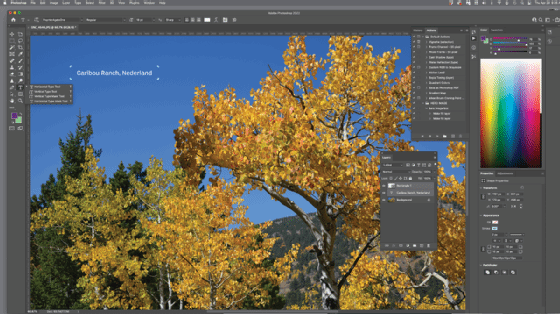
Adobe Photoshop
A look at some of the features in Photoshop.

What are Photoshop's features?

Photoshop comes with a multitude of features, fonts, effects, and brush or pen tools. Here are some of the most common ones:

  • Brushes are one of the most popular tools in Photoshop. They can be used for various effects, including compositing, painting, erasing and retouching images.
  • The Clone Stamp allows you to copy pixels from one area of an image and paste them into another area. This is useful for repairing damaged or corrupt images.
  • The Healing Brush is similar to the Clone Stamp, but it blends the copied pixels with the surrounding pixels for a more natural look.
  • The History Brush allows you to revert an image to a previous state. This is useful for undoing mistakes or going back to a point in your workflow where you were happy with the image.
  • Blur blurs the pixels in an image, making them less distinct. This can be used to create a soft, dreamy look or reduce the appearance of wrinkles and other imperfections.
  • Sharpen does the opposite of Blur, making pixels more distinct. This can be useful for making an image appear more transparent or creating a more dramatic effect.
  • Dodge and Burn are used to lighten or darken areas of an image. These are commonly used in photo retouching to make subjects appear more defined.
  • The Sponge tool can either absorb or release color from an image. This is useful for correcting colors that are too light or too dark.

Introduction to adobe photoshop

 Photoshop is a photo-editing software. It is a popular image changing software package. It was developed in 1987 by the American brothers Thomas and John Knoll. There are two types of graphic software – Vector Graphic and Raster Graphic. This software provides many image editing features for raster (pixel-based) images as well as vector graphics. In technical language, Photoshop is a RASTER graphic software, which means it is used to edit the raster graphics. 

RASTER is a combination of pixels. A group of pixels forms a graphic called Raster Graphics. There are various forms of formats of Raster Graphics – 
 

  • JPEG – Joint Photographic Experts Group
  • PNG – Portable Network Graphics
  • GIF – Graphics Interchange Format

Photoshop is a tool for designers, web developers, graphic artists, photographers, and creative professionals. It is widely used in industries. Web Designer uses photoshop first to make a logo for website. Application Designer also uses photoshop first to create User Interface for his application. Even, 3D game developer also uses photoshop to create a digital painting of its character in game. One can also develop Matte Painting (which is unusual, as the unreal type of scenes) scenes using these tools. 


Workspace and Interface : 
Opening photoshop on lap
top, welcome screen will appear. To work on any photo select it. On the left, photoshop tools will appear and on right, layer panel and color panel appear. The working area in center is known as canvas. 
Sometimes, we don’t get a toolbar or layer panel on screen. To resolve this problem, Go to windows written on upper part of screen and then to workspace and then reset essentials. The toolbar or layer panel or anything if goes missing on screen can be resolved by this problem. 

When we open workspace, there comes several options like 3D for a 3D designer, Graphics and Web for graphics and web designing, Motion for animations, paintings and photography.